
This extension for Mozilla Thunderbird allows you to specify, for each separate mail folder, a message, sound and/or a system command that will be executed when new mail is found there. This way, you specify different actions for less important folders, or no action at all.
Usage
See the Manual for information on how to use Mailbox Alert.
Download
Mailbox Alert is hosted on ATN so you can download it from there, or from the addon dialog in Thunderbird itself.
Alternatively, you can download and install it manually from here.
The current version is 0.27.
To install it in Thunderbird, right-click the link, choose "Save as", go to Tools->Addons in Thunderbird, select 'Extensions' on the left, then click the cog icon in the upper right, and select 'Install from file', and select the downloaded xpi file.
You can also download and install it through Mozilla's AMO website or, depending on your version, the dialog within Thunderbird.
Source
The source code is available at Github
Changelog
-
[0.26-0.27]
- Update the popup notification to work better with (dark) themes
- Update the windowListener API to work with upcoming Thunderbird versions
-
[0.25-0.26]
- Fixed an error ("ReferenceError: Services not found") when trying to execute a command that itself contains an error. See https://github.com/tjeb/Mailbox-Alert/issues/24
- Workaround for an issue with running commands with arguments that have non-ascii characters, by forcing TB to convert it to utf-8
-
[0.25-0.25.1]
- Fixed the issue 'undefined entity' when using a language setting other than en-US
-
[0.24-0.25]
- Made Mailbox Alert compatible with Thunderbird 78 by using the windowListener experiment from John Bieling (See https://github.com/thundernest/addon-developer-support)
- Added an option to execute command to let double-quotes in arguments be escaped by another double-quote, for use with Windows cmd.exe
-
[0.23.1-0.24]
- The Mailbox Alert action for Message Filters now works with Thunderbird 68
- Unfortunately, the changed APIs do mean that it now no longer works with older versions (Thunderbird 60 and before), so from now on, older versions of TB are no longer supported by new versions of Mailbox Alert. From now on, the minimum TB version is 68, and I will start removing legacy code in the future.
- The %folder macro no longer adds a trailing / to the final folder (thanks to https://github.com/rnc)
-
[0.22-0.23.1]
- Fixed issue where %server and %folder macros were no longer working
- Fixed issue where deleting alerts did not work
-
[0.21-0.22]
- Update the overlay system, this should fix an issue with tag colors disappearing in folder lists
-
[0.20-0.21]
- Removed the 'delay' menu option in the folder context popup, it is now only available from the global 'tools' menu.
-
[0.19-0.20]
- Fixed issues due to API changes in thunderbird
- Updated compatibility to TB 0.69b
-
[0.18-0.19]
- Update for new Thunderbird APIs
- Should fix 'browse' buttons
- Should fix installation/compatiblity errors up to 67 (beta)
- Added Norwegian Bokmål translation (thanks @DandelionSprout)
- Remove error popup for unknown folder in audio browse file picker
-
[0.17-0.18]
- Updated for compatibility with Thunderbird 60+
-
[0.16.7-0.17]
- Made the code compatible with Thunderbird 59beta
- Improved internal checks to see if a message is still being processed by filters
- Built-in delay before an alert fires is now much shorter
- Added new setting 'delay', for users that do want or need a delay before an alert fires
- Fixed an issue that cause 'open message in current window' to fail
- Fixed an issue where multiple alerts at the same time could interfere with each other, causing one of them to get 'stuck'
-
[0.16.6-0.16.7]
- Missed a fix for a changed interface class in the upload for 0.16.6, fixed in this version
-
[0.16.5-0.16.6]
- Updated to changed interfaces up to Thunderbird 57
-
[0.16.4-0.16.5]
- Added %recipient, %recipientname and %recipientaddress macros
- Resize the settings window if a larger icon is set
-
[0.16.3-0.16.4]
- Fixed a bug where defined alerts could not be deleted anymore. This was caused by what appears to be an internal interface change, so this fix might have also fixed a few other issues hitherto unknown.
-
[0.16.2-0.16.3]
- Fixed a bug where alerts were fired for child folders even if the 'alert for child folders' option was not set (Patch submitted by Jon Siddle, thanks!)
-
[0.16.1-0.16.2]
- Fixed a bug where %count was not replaced correctly in the 'execute a command' option.
-
[0.16-0.16.1]
- The final file that got uploaded as 0.16 had missed a few final cleanup updates and fixes, one of which can cause some messages not to appear, and one where the fade option causes a loop. These issues should be fixed in this version.
-
[0.15.3-0.16]
- Sound playback should no longer be interrupted
- Reworked the internal triggering system; reintroduced delays to prevent multiple messages in one folder causing multiple alerts, and fixed the 'double alert' issue for filters. This should also fix the problem where sometimes alerts weren't fired at all.
- Removed the call to updateFolder() which may be the cause of seemingly unrelated caching problems in Thunderbird
- Fixed a looping issue in the closing of fading alerts
-
[0.15.2-0.15.3]
- Fixed a bug when selecting a new icon and an alert was shown
- Fixed a bug when selecting a new icon and the window was not resized properly
- Fixed a bug where play a sound resulted in an error if the global mute had never been set
-
[0.14.5-0.15.0]
- Configuration has changed; you can now define a set of alerts, and specify one or more alerts per folder directly from the folder context menu. Existing configuration is automatically converted to the new one.
- Mailbox alert can now also be used as a filter action
- You can now right-click the alert message popup to get a menu with all the available actions mailbox alert can do on the message (this list is similar to the default click action you can configure)
- If duration for popups is set to 0, it is never automatically closed
- You can now choose custom locations on your screen for the 'show message' option.
- Added a %date and a %time macro
- Sliding and fading alerts should be smoother now
- Added an option to delete the message from the alert popup (moves it to trash)
- Changed the way Mailbox Alert listens to the arrival of new messages. There should no longer be a delay between the arrival and the alert, and some problems that people have been experiencing should now be solved.
- Execute a command now supports quoting with "
- Internal sound is no longer the system beep but a built-in bell sound.
- [0.14.4-0.14.5]
- Fixed an issue on Thunderbird 2 caused by a changed internal API, where alerts would not fire at all in some circumstances.
- Fixed another issue with Thunderbird 2 where 'execute a command' did not work for some executables.
- [0.14.3-0.14.4]
- Fixed a problem where the check if a command is executable failed on Windows, even though the command would run fine
- Fixed a problem where the folder was not always correctly selected with the 'Open in current window' option
- [0.14.2-0.14.3]
- Fixed a problem with older thunderbirds that don't have some functions newer versions do
- Fixed a bug in the assignment of a few of the macro variables
- [0.14.1-0.14.2]
- Fixed some locales that were not included in last release
- Some internal refactoring (nothing user-visible)
- [0.14-0.14.1]
- Fixed a problem with Thunderbird 2
- Updated da-DK locale
- [0.13-0.14]
- New option in 'global preferences', open the message in existing window (and raise it)
- Alert message window is immediately closed after it is clicked
- Added a global 'mute' selection (in the tools menu)
- An earlier release lost a lot of translations, these have been re-added, though they are not complete yet (so some english may still occur)
- [0.13.2-0.13.3]
- Updated to work with Thunderbird 3.1
- Updated allowed programs to include SeaMonkey 2.0.x
- [0.13.1-0.13.2]
- Updated to work with Thunderbird 3
- [0.13-0.13.1]
- Fixed a bug in the command section of the preferences screen
- Fixed a bug in the no-alert-to-parent section
- [0.12-0.13]
- the popups no longer uses the internal alerts service (which was very limited and on some platforms missing altogether). I have replaced it with a personal version of something that works a bit like the alerts in tb2.
- This means that there is now an extra settings screen, available through 'global alert settings' in the normal prefs screen, where you can set:
- the delay of the popup
- the duration of the popup
- the position of the popup
- an appearance effect
- what to do when you click on the popup (open message or close popup)
- This also means that popup alerts should be available to OS X users
- The icon is now optional in alert popups
- Major change in settings storage: only non-default settings are stored; this should mean that the problems for people with a lot of mailboxes should be mitigated, unless they specify maximal separate settings for each and every folder
- Added it-IT locale
- Added pt-PT locale
- [0.11-0.12]
- Updated allowed version of Thunderbird to include 2.0 Release candidates
- It does not make any use of the improved alerts system, but still uses the old one, which has been tested and still seems to work.
- Fixed a bug in the %folder macro where the complete URI was shown instead of just the folder name
- [0.10-0.11]
- Added localization for de_DE (thanks Archaeopteryx)
- Complete change to the way the settings are stored, settings should now be kept if you use localization, or change the name of a folder)
- IMPORTANT: YOUR OLD SETTINGS WILL BE GONE IF YOUR REVERT TO AN OLD VERSION
- Settings will be back when you upgrade back to 0.11
- Before you restart, you can copy your prefs.js file if you only want to test first
- Fixed bugs where localization broke storing settings, see previous point
- Fixed a bug in charset conversion
- [0.9-0.10]
- Localization support (current locales: en_US, nl_NL and fr_FR, thanks Jean-Michel).
- Alerts that fail are automatically disabled,
- The built-in alert service is disabled for setups that don't support it (OSX, old Thunderbird versions)
- The preferences screen has been reduced in size, and the macro explanations have been moved to a separate window.
- Mailbox Alert is now triggered by additions to folders and does not need to search through the whole folder again, so the speed problems ('hanging script alerts') should be gone now.
- Manually setting a message to unread no longer triggers an alert.
- Virtual folders can no longer be configured, and are disabled if they are.
- Error messages are now more clear.
- File paths should now be displayed correctly on all platforms (OSX gave some Base 64 string instead of the file name).
- [0.8-0.9]
- You can now set a folder to alert for its subfolders, and you can set alerts on complete accounts
- Alerting is now done through a delayed queue, which means that:
- When multiple new messages arrive for one folder, only one alert is shown
- When new messages arrive in different folders, the alerts are shown one at a time
- There is a 2 second delay before alerting so the junk filter can run first
- Preferences screen has been improved, unused settings boxes are disabled
- The Test option from the tools menu has been removed, use the button from the preferences screen now
- Bugfixes, most notably:
- Different charsets are now displayed correctly in the default message popup
- Empty values for macro replacements (like subject) don't break the alert anymore
- Alert are now shown as soon as mail arrives (sometimes this did not work with IMAP or user-defined filters)
- [0.7-0.8]
- Added direct show message option (which calls built-in alert service)
- Added play sound option
- %sendername is stripped from surrounding quotes
- Added test button in preferences dialog
- Updated icons
- [0.6-0.7]
- Added a Browse button to select the program to execute
- Added a Last command button that copies the last saved command to the current command field (convenient when setting the same command to multiple folders).
- Better error messages
- [0.5-0.6]
- There is a toggle in the settings that replaces special characters in the macro contents by their HTML Entity numbers. Only the ASCII Entities from the HTML specification are replaced (", ', &, << and >>).
- There are two new macros:
- %sendername This is replaced by the name part of the sender's address (up to the first <<).
- %senderaddress This is replaced by the address part of the sender's address (between the << and the >>).
- If the address does not contain << and >>, these values are the same as %sender
- [0.4-0.5]
- Arguments to executable are nog longer prepended by a space (which breaks everything you call with it that uses options).
- The actual command and it's arguments are now dump()ed if you set browser.dom.window.dump.enabled to true.
- [0.3-0.4]
- Added some debug messages using the dump() function (enable them by setting browser.dom.window.dump.enabled to true in your settings)
- No longer alerts with 'locked' or exceptions, instead it ignores the locked setting (doesn't seem to matter anyway for reading out folder data) and uses dump() for exceptions.
- [0.2-0.3]
- Changed the possible Thunderbird version to 1.0 - 1.9+ so that it also works in 1.5
- Fixed bad backslashes in front of << >> and & characters in the messages
- [0.1-0.2] Made the function call non-blocking
- [0.0-0.1] Initial version
Usage Example
If you don't like the default system messages, you can use libnotify (Thanks for the tip, Alf :) ) to show new mail arrived:
/usr/bin/notify-send -i /usr/share/pixmaps/mozilla-thunderbird.xpm %sendername\ %folder %subject
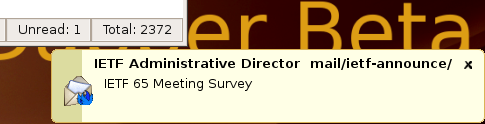
Don't forget to turn on the HMTL tags checkbox, otherwise the texts don't appear if there is a '<' character in it.
External Windows Alert Tool
A friend of mine, who wishes to remain anonymous, whipped up some c++ code to show a popup from the system tray, so you can have nice messages in Windows too.
There is a second version already, this one shows the Thunderbird icon, and has a third optional argument; the timeout in milliseconds.
You can download the source and binary: Popup2.zip Popup.zip
To use it, copy the file Popup.exe from the zip to a directory on your hard drive, and set the mailbox alert to:
c:\<<dir>>\Popup.exe %sender %subject
If your directory has spaces in it, put a \ in front of them. Quoting does not work. It looks weird with the backslash also being the directory separator, but it works.
This code is unsupported. I do not have access to a windows machine with a compiler and will not be able to improve on this. I have tested it briefly on a Windows XP machine and it seems to work.
If you do have a compiler, and can improve on it, I will gladly put it up on this page, or link to your site, provided the source is up there too.
mNotify
Another option to use with Windows is mNotify which looks pretty nice if you don't mind the color. It takes two arguments (remember, if you want spaces within the arguments, put a backslash in front of them.
Mailbox Alert for OSX
(this is for versions before 0.13, or for people who like Growl better than the internal system. Which would be understandable)
I have had reports that Mailbox Alert's 'show a message' option produces an error when using it on mac OSX. Apparently this part of the Thunderbird/XPCOM library is disabled for OSX at the moment.
Users are adviced to use Growl for showing alerts.
A nice example line for growl is:
/usr/local/bin/growlnotify -a thunderbird %folder %sender %subject
Here is more information on how to use Growl.
notify-more
If you want a more interactivity, and your operating system contains the python-notify (or notify-python, names seem to differ) package, you can also use notify-more, with this you can add a 'show' button to the popup message.
Old Versions
- mailboxalert-0.26.
- mailboxalert-0.25.1.
- mailboxalert-0.25.
- mailboxalert-0.24.xpi
- mailboxalert-0.23.1.xpi
- mailboxalert-0.22.xpi
- mailboxalert-0.21.xpi
- mailboxalert-0.20.xpi
- mailboxalert-0.19.xpi
- mailboxalert-0.18.xpi
- mailboxalert-0.17.xpi
- mailboxalert-0.16.7.xpi
- mailboxalert-0.16.3.xpi
- mailboxalert-0.16.2.xpi
- mailboxalert-0.16.1.xpi
- mailboxalert-0.16.xpi
- mailboxalert-0.15.3.xpi
- mailboxalert-0.15.2.xpi
- mailboxalert-0.15.1.xpi
- mailboxalert-0.15.0.xpi
- mailboxalert-0.14.5.xpi
- mailboxalert-0.14.4.xpi
- mailboxalert-0.14.3.xpi
- mailboxalert-0.14.2.xpi
- mailboxalert-0.14.1.xpi
- mailboxalert-0.14.xpi
- mailboxalert-0.13.3.xpi
- mailboxalert-0.13.2.xpi
- mailboxalert-0.13.xpi
- mailboxalert-0.12.xpi
- mailboxalert-0.11.xpi
- mailboxalert-0.10.xpi
- mailboxalert-0.9.xpi
- mailboxalert-0.8.xpi
- mailboxalert-0.7.xpi
- mailboxalert-0.6.xpi
- mailboxalert-0.5.xpi
- mailboxalert-0.4.xpi
- mailboxalert-0.3.xpi
- mailboxalert-0.2.xpi
- mailboxalert-0.1.xpi